Tuesday, 27 November 2018

Feature Toggling from the Trenches

Feature Toggling from the Trenches

The Problem

Imagine you have a software product that is under constant development; that's probably not all that difficult. Imagine now you want to commit your stable but partially-completed feature into your trunk repo, but not make it available until it's ready. Now imagine you are developing a feature that will be a premium feature, only available to a small section of your customers.

NewVoiceMedia had these problems, and more, and solved them - mitigated them at least - by using feature toggling.

A Feature Toggle Mechanism

This story starts about 5 years ago. NewVoiceMedia had a history of implementing naive solutions to the problem of allowing a feature for a specific customer or group of customers. Often the solution consisted of a new control in an existing screen accessed by a NewVoiceMedia administrator, with the setting stored in a bespoke field in the database. Sometimes it came with a whole new admin screen. Sometimes a feature was enabled via a value in a web.config file. These solutions were either costly to implement in terms of time and effort, or costly to maintain so meant that it was not done for every new feature.

The upshot of this is that most code went to production with no ability to shut off a new feature if something unexpected happened - in spite of manual and automated tests, unexpected things do happen. Some of these unexpected things led to rollbacks of production releases, and decreased customer confidence in our product. As we moved towards quicker releases to production, the need to protect the stability of the product became more and more important, together with our desire to check code in to the trunk/main branch as early as possible.

The first implementation of a toggling system was a list of toggle names and default values (on/off) and a database table that stored overrides of that default value for customers. This was backed by a service to read the values to determine if a feature was enabled. The code containing a toggled feature would look something like:

foo();

if(toggles.Enabled(FeatureType.ReticulateSplines, customer))
{
    splines.Reticulate();
}

bar();

This implementation was quick and easy to implement from a developer's perspective but required manual scripts running to set override values in the database. This quickly became tiresome, so the next evolution was a screen to allow administration of overrides.

This is the basic system that's in place today. We've made enhancements and tweaks to the system along the way when the need has arisen, for example:

  • Caching of override values
  • Tagging of feature toggles, allowing:
    • Visual grouping on the admin screen
    • Clearer separation between development toggles (to enable swift rollback of code, to protect the platform) and customer toggles (to enable a premium feature for a particular account)
  • Introducing different levels of granularity for toggles
    • Platform-wide, to turn a feature on or off for all customers
    • User-specific, to allow a specific user to have access to a feature

Toggle lifecycle

Introducing this mechanism means that it's very easy to add a developer toggle to every new feature. As you can imagine that leads to a large number of toggles, and their related checks become dotted around the code. When a developer toggle outlives its usefulness, it's in the technical debt pile. This means that each developer needs to be disciplined in removing unused toggles when they're no longer relevant. The lifecycle of a development toggle at NewVoiceMedia generally runs like this:
  • Introduce a toggle, default the value "off"
  • Develop the feature behind the toggle, including extending appropriate automated tests, to execute code with a toggle on and off
  • Enable the toggle for test customers in a test environment. This allows the feature to be tested while it's being developed (for early feedback)
  • Turn the toggle on in production for selected clients
  • After feedback is gathered, change the default value of the toggle to "on", leaving code and tests in place for toggle on and off
  • Remove the unit tests testing the toggle "off" code
  • Remove the toggle "off" code
  • Remove the toggle itself

Observations

If I was writing a toggle mechanism again from scratch, I would use the patterns that I've learnt along the way with the NewVoiceMedia journey. One thing I would do differently is avoid the choice of a default value for toggles; all toggles would be off unless an override exists. This would simplify logic in calculating the value of a toggle.

I would also consider using a 3rd party library for toggle management. This page lists a few libraries available https://featureflags.io/dotnet-feature-flags/

Read more about feature toggling as a concept on Martin Fowler's blog https://martinfowler.com/articles/feature-toggles.html

Tuesday, 25 July 2017

Decorator pattern

Why?

I have a colleague who is officially a tester and scrummaster, and he has a growing interest in the code we (the developers) write. He asked a question this morning: "I've heard you talk about decorators, what are they?". I thought the best way to describe it is to write it down.

What?

The decorator pattern allows you to add functionality to a class without changing the underlying class. (See Open/Closed principle)

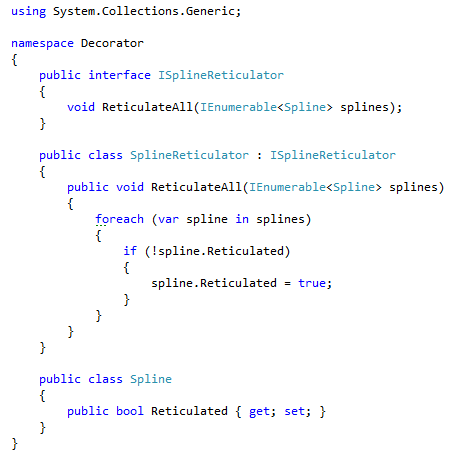
As an example, there's a class that reticulates splines:

Imagine you wanted to add logging to this class, to store the number of splines reticulated. You could add the logging directly into the class:

Alternatively you could add a decorator (literally "decorate" the class with new behaviour). The idea behind the decorator pattern is that the decorating class implements the same interface as the underlying class, and wraps an instance of the underlying class. This way it can pass through to the underlying instance, and add value along the way.
This gives you the ability of adding several layers of behaviour, and swapping in and out that behaviour as and when required:

Friday, 18 April 2014

Calling generic methods with runtime Type parameters

In the normal course of events, a call to a generic method needs to have its type resolved at compile time. For example, consider this class and method:
class TypeWriter
{
    public void WriteType<T>(TextWriter target)
    {
        target.WriteLine("T is {0}"typeof(T));
    }
}
This generic method needs to be called with its type parameter resolved at runtime, like this:
var typeWriter = new TypeWriter();
typeWriter.WriteType<Program>(Console.Out);
which gives this output:


But what do you do if you only discover the types at runtime so don't know the types at compile time? This commented code wouldn't compile because the variable assemblyType can't be resolved to a generic parameter:
foreach (var assemblyType in Assembly.GetExecutingAssembly().GetTypes())
{
    // typeWriter.WriteType<assemblyType>(Console.Out);
}

This is where System.Reflection comes in. The MethodInfo class has a method MakeGenericMethod that takes an array of System.Type, substitutes the method's generic parameters for the arguments and returns a new MethodInfo instance. This new MethodInfo instance can then be invoked like any other. Here's how this looks in code:
foreach (var assemblyType in Assembly.GetExecutingAssembly().GetTypes())
{
    // Get a handle on the method to call
    var method = typeof(TypeWriter).GetMethod("WriteType");

    // Pass the type parameter(s)
    var genericMethod = method.MakeGenericMethod(assemblyType);

    // Call the method on the TypeWriter instance, passing parameter(s)
    genericMethod.Invoke(typeWriter, new[] { Console.Out });
}
This gives the output:


Thursday, 3 April 2014

KeyedCollection

During a talk at DevWeek 2014 I discovered the KeyedCollection<TKey,TItem> class. The class is in the System.Collections.ObjectModel namespace, and is an alternative to the Dictionary<TKey,TValue> for items where the key is embedded in the item itself. The following code sample shows where it pays dividends to use a KeyedCollection over a Dictionary.

The following program creates a dictionary of Person objects; it uses the Id of the Person as the key, and the person itself as the value:


Bearing in mind that this is a contrived example, there is a problem with this code; having to specify the key manually has lead to a typo (didn't you spot it?):


If the key to use for your collection item can be derived from the value, the KeyedCollection allows you to do that.
The KeyedCollection class is abstract, so you need to inherit from it. Having done so, you can override the GetKeyForItem method; this is the method that the framework calls to obtain the key of the item:


Items can then be added to the collection as you would any collection, either using the Add method, or an object initialiser as I've done here:


When retrieving an item, the KeyedCollection behaves like a Dictionary rather than a List, because you access items by their key rather that their position in the collection:


See more about the KeyedCollection class on MSDN: http://msdn.microsoft.com/en-us/library/ms132438(v=vs.110).aspx

System.BitConverter Class

Every now and again a new framework class comes to my attention. At DevWeek I was attending a talk on Cryptography and an incidental part of the talk featured the BitConverter class. This is a class in the System namespace and has a bunch of static methods that convert to and from a byte array.

The ToString(byte[]) method was the one that I saw being used. It takes an array of bytes and converts each byte to its 2 character hexadecimal equivalent. This is an alternative to Base64 encoding and is arguably more human-friendly.


Other methods on the BitConverter class allow you to convert between a byte array and numerical types:

For more details, see the MSDN documentation at http://msdn.microsoft.com/en-us/library/system.bitconverter(v=vs.110).aspx

Thursday, 31 October 2013

Faking AppSettings in tests

If you have some code that uses configuration from an app.config or web.config file, and you need to retrospectively write tests for it, there are several approaches you can take to get fake setting into your tests.

Given this code
using System;
using System.Configuration;
using System.IO;

namespace Demo
{
    class Program
    {
        static void Main(string[] args)
        {
            using (var writer = new StringWriter())
            {
                new SeasonWriter().WriteSeason(writer);
                Console.WriteLine(writer);
                Console.ReadLine();
            }
        }
    }

    public class SeasonWriter
    {
        public void WriteSeason(TextWriter textWriter)
        {
            var month = ConfigurationManager.AppSettings["Month"];
            switch (month)
            {
                case "January":
                case "February":
                case "December":
                    textWriter.Write("Winter");
                    break;
                case "March":
                case "April":
                case "May":
                    textWriter.Write("Spring");
                    break;
                case "June":
                case "July":
                case "August":
                    textWriter.Write("Summer");
                    break;
                case "September":
                case "October":
                case "November":
                    textWriter.Write("Autumn");
                    break;
                default:
                    throw new ConfigurationErrorsException("No setting defined for 'Month'."
                        + Environment.NewLine
                        + "Please add a setting to the .exe.config file under the section AppSettings."
                        + Environment.NewLine
                        + "For more info on the .exe.config file, follow this link "
                        + "http://msdn.microsoft.com/en-us/library/vstudio/1fk1t1t0(v=vs.110).aspx");
            }
        }
    }
}
In order to get tests around the SeasonWriter class, the AppSettings entry "Month" needs to be faked or abstracted. Some options are:

Create an app.config file in the test project

This is the most obvious starting point. Create a test project to contain the SeasonWriterTests file, with an app.config containing a "Month" entry:
<appSettings>
  <add key="Month" value="January"/>
</appSettings>
using NUnit.Framework;
using System.IO;

namespace Demo.Test
{
    [TestFixture]
    public class SeasonWriterTests
    {
        [Test]
        public void WriteSeasonExpectWinter()
        {
            var writer = new StringWriter();
            var target = new SeasonWriter();
            target.WriteSeason(writer);
            Assert.That(writer.ToString(), Is.EqualTo("Winter"));
        }
    }
}
This will allow the test to run, but will limit you to testing a single path through the code. It's also flaky, because your test depends on a magic string in a separate file.

Pass the configuration setting in


This solution is a refactor of the WriteSeason method, so it takes the config setting in as a string. This sounds like a clean fix, with benefits
  • the responsibility for getting that value has been handed off to the user of the method
  • the code is easier to test

However, there are downsides
  • the refactor is an untested change
  • there could be many users of this method, and each one would be responsible for getting the month value
  • the exception type in the WriteSeason method is no longer correct

Set the config value


The easiest way to fake an AppSettings value is just to set it in your test class. ConfigurationManager.AppSettings is just a NameValueCollection, and items can be written as well as read:
using NUnit.Framework;
using System.IO;
using System.Configuration;

namespace Demo.Test
{
    [TestFixture]
    public class SeasonWriterTests
    {
        [TestCase("January""Winter")]
        [TestCase("February""Winter")]
        [TestCase("March""Spring")]
        [TestCase("April""Spring")]
        [TestCase("May""Spring")]
        [TestCase("June""Summer")]
        [TestCase("July""Summer")]
        [TestCase("August""Summer")]
        [TestCase("September""Autumn")]
        [TestCase("October""Autumn")]
        [TestCase("November""Autumn")]
        [TestCase("December""Winter")]
        public void WriteSeasonExpectCorrectSeasonForMonth(string month, string expectedSeason)
        {

          ConfigurationManager.AppSettings["Month"] = month;

            var writer = new StringWriter();
            var target = new SeasonWriter();
            target.WriteSeason(writer);
            Assert.That(writer.ToString(), Is.EqualTo(expectedSeason));
        }
    }
}

Friday, 25 October 2013

Disposable HtmlHelper Extensions

If you're regularly using a block of HTML elements consisting of opening tags and closing tags, you might want to employ the using pattern used by the framework's FormExtensions:


This is pretty straightforward; you need to create a class that implements IDisposable and render the opening tags in the constructor, and the closing tags in the Dispose method.

As an example I'll implement an HtmlHelper extension that renders a multi-column table with a header row containing the column titles specified, that will be rendered like this:


The first step is to create a static class for the extension method, and the extension method itself. This should be an extension method for the HtmlHelper object, and needs to return an instance of a class that implements IDisposable:


The HtmlHelper exposes a ViewContext, which has a Writer property; this is a TextWriter, and it's this object that stores the HTML that will be sent to the HttpResponse. The writer is the object that we need to pass our HTML string to. For this example, I also need the headers to render, so I've added a params parameter to the extension method:


The implementation of the disposable helper constructor builds and writes the table header, and the dispose method writes the closing tag:


The usage of the helper in the view can be changed to this:


Or this:


And gets rendered like this:


The code for the example helper class is available as a GitGist

Saturday, 19 October 2013

Dealing with static methods in unit tests

This is a follow up post to my previous one on adding tests to legacy code, and shows several techniques for removing a dependency on a call to a static method. Once again, I make no apologies for the state of the resulting code; these techniques are each a pragmatic step towards getting legacy code under test so it can be refactored.

The code to test

The class to write tests for is intentionally simple; it has a single method that takes a string which is used to look up a value in a file, and modifies that string before returning it. Because of the dependency on a file, the code doesn't run from a unit test without that file being present.
public class Builder
{
    public string BuildString(string configName)
    {
        var retVal = ConfigReader.GetConfig(configName);
        return "xx" + retVal + "xx";
    }
}
The ConfigReader class also has a single method, that reads a value from a custom configuration file:
public class ConfigReader
{
    public static string GetConfig(string setting)
    {
        using (var reader = File.OpenText("..\app.config"))
        {
            string line;
            while ((line = reader.ReadLine()) != null)
            {
                var elements = line.Split('=');
                if (elements[0] == setting)
                {
                    return elements[1];
                }
            }
        }
        return null;
    }
}

Add virtual method

This is the technique that I highlighted in my original post. It involves creating a virtual method in the class under test, which in a production setting will delegate the call to the existing static method. In a test scenario though, it allows the class under test to be subclassed, and override the virtual method to return a dummy result.

Notes

  • This technique can only be used when the class under test is not sealed
  • It requires no changes to the static class

Steps to implement:

Class under test
  1. Add a virtual method
  2. Delegate the call to the static method to the new virtual method
  3. Update calls to the static method to call the new method
public class Builder
{
    public string BuildString(string configName)
    {
        // 3
        var retVal = GetConfig(configName);
        return "xx" + retVal + "xx";
    }

    // 1
    protected virtual string GetConfig(string configName)
    {
        // 2
        return ConfigReader.GetConfig(configName);
    }
}
Test class
  1. Create a subclass of the class under test
  2. Override the virtual method to return a known result
  3. Create an instance of the subclass as the test target
[TestFixture]
public class BuilderTests
{
    [Test]
    public void BuildString()
    {
        // 3
        var target = new FakeBuilder();
        Assert.That(target.BuildString(""), Is.EqualTo("xxExpectedxx"));
    }

    // 1
    private class FakeBuilder : Builder
    {
        // 2
        protected override string GetConfig(string configName)
        {
            return "Expected";
        }
    }
}

Delegate to instance method

This technique involves adding an instance method to the dependency class, and extracting its interface. A stub of this interface can then be passed to the class for testing.

Notes

  • This technique can only be used when the dependency class is not marked static

Steps to implement:

Dependency class
  1. Add an instance method
  2. Delegate from the instance method to static method
  3. Extract the interface
  4. Implement the interface
// 3
public interface IConfigReader
{
    string GetConfiguration(string setting);
}

//4
public class ConfigReader : IConfigReader
{
    // 1
    public string GetConfiguration(string setting)
    {
        // 2
        return GetConfig(setting);
    }

    public static string GetConfig(string setting)
    {
        using (var reader = File.OpenText("..\app.config"))
        {
            string line;
            while ((line = reader.ReadLine()) != null)
            {
                var elements = line.Split('=');
                if (elements[0] == setting)
                {
                    return elements[1];
                }
            }
        }
        return null;
    }
}
Class under test
  1. Add a new constructor to accept an implementation of the interface
  2. Update existing constructor(s) to create default implementation
  3. Update calls to static method to call interface method
public sealed class Builder
{
    private IConfigReader configReader;

    // 2
    public Builder()
        : this(new ConfigReader())
    { }

    // 1
    internal Builder(IConfigReader ConfigReader)
    {
        this.configReader = ConfigReader;
    }

    public string BuildString(string configName)
    {
        // 3
        var retVal = configReader.GetConfiguration(configName);
        return "xx" + retVal + "xx";
    }
}
Test class
  1. Stub the new interface
  2. Pass the stub to the new constructor
[TestFixture]
public class BuilderTests
{
    [Test]
    public void BuildString()
    {
        // 1
        var configFileReader = MockRepository.GenerateMock<IConfigReader>();
        configFileReader.Stub(fr => fr.GetConfiguration(Arg<string>.Is.Anything))
            .Return("Expected");

        //2
        var target = new Builder(configFileReader);
        Assert.That(target.BuildString(""), Is.EqualTo("xxExpectedxx"));
    }
}

Wrap static class

This technique is to create an instance class that delegates calls to the static class, but allows an interface to be specified for the calling class to use.

Notes

  • This technique does not require any change to the dependency class

Steps to implement:

Wrapper class
  1. Create a new class with an instance method
  2. Delegate from the instance method to the static methods
  3. Extract the interface of the new class
// 3
public interface IConfigReaderWrapper
{
    string GetConfig(string setting);
}

// 1
public class ConfigReaderWrapper : IConfigReaderWrapper
{
    // 2
    public string GetConfig(string setting)
    {
        return ConfigReader.GetConfig(setting);
    }
}
Class under test
  1. Add a new constructor to accept an implementation of the new interface
  2. Update existing constructor(s) to create the default implementation
  3. Change all static method calls to call instance methods on the new interface
public class Builder
{
    private IConfigReaderWrapper configReader;

    // 2
    public Builder()
        : this(new ConfigReaderWrapper())
    { }

    // 1
    internal Builder(IConfigReaderWrapper ConfigReader)
    {
        this.configReader = ConfigReader;
    }

    public string BuildString(string configName)
    {
        // 3
        var retVal = configReader.GetConfig(configName);
        return "xx" + retVal + "xx";
    }
}
Test class
  1. Stub the new interface
  2. Pass to stub to new constructor
[TestFixture]
public class BuilderTests
{
    [Test]
    public void BuildString()
    {
        // 1
        var configFileReader = MockRepository.GenerateMock<IConfigReaderWrapper>();
        configFileReader.Stub(fr => fr.GetConfig(Arg<string>.Is.Anything))
            .Return("Expected");

        // 2
        var target = new Builder(configFileReader);
        Assert.That(target.BuildString(""), Is.EqualTo("xxExpectedxx"));
    }
}

Pass lambda as implementation of static method

This technnique is to use a property on the static class to hold the implementation of the static method, and pass a fake implementation for testing.

Notes

  • Does not need changes to the class under test

Steps to implement:

Static class
  1. Extract the implementation of the static method to a private static method
  2. Add a static property to hold a lambda whose signature matches that of the private method
  3. Add a static constructor
  4. Default the lambda to call the private method
  5. Modify the static method to execute the lambda held in the property
public static class ConfigReader
{
    // 2
    internal static Func<stringstring> getConfigImpl { get; set; }

    // 3
    static ConfigReader()
    {
        // 4
        getConfigImpl = s => _GetConfig(s);
    }

    public static string GetConfig(string setting)
    {
        // 5
        return getConfigImpl(setting);
    }

    // 1
    private static string _GetConfig(string setting)
    {
        using (var reader = File.OpenText("..\app.config"))
        {
            string line;
            while ((line = reader.ReadLine()) != null)
            {
                var elements = line.Split('=');
                if (elements[0] == setting)
                {
                    return elements[1];
                }
            }
        }
        return null;
    }
}
Test class
  1. Set the new property on the static class to the fake implementation
[TestFixture]
public class BuilderTests
{
    [Test]
    public void BuildString()
    {
        // 1
        ConfigReader.getConfigImpl = s => "Expected";
        
        var target = new Builder();
        Assert.That(target.BuildString(""), Is.EqualTo("xxExpectedxx"));
    }
}

Any more?

One other technique is to use an advanced mocking framework that can stub static methods; unfortunately none of the free ones I know have this feature.

Can you think of any other techniques that I haven't covered? If so, please leave a comment and let me know.

The code for these examples is on GitHub, click here.

Sunday, 13 October 2013

Refactoring legacy code to add tests

Imagine you have some legacy code in your product. Code that's been added to over the years by several different developers, none of who were certain they understood the code. There is no separation of concerns; the code has business logic and database access baked in. There's no useful documentation and the code comments are no more than sarcastic outbursts of cynicism.

A bug report has come in that suggests some of the SQL being executed from this method is invalid. So, what's the plan? Hack the SQL construction around until it feels like it does what you want, hoping you haven't broken anything else in the class? Or take a more structured approach?

To illustrate the problem, I have written some legacy-style code so I can show how to refactor it to make it testable. The techniques here are a pragmatic approach to getting legacy code under test, while making as few untested changes as necessary. Because as you will already know, a class is only able to be refactored when it's under test.

The code for the class is available on GitHub here, and looks like this
using System.Collections;

namespace CombinationOfConcerns
{
    public class Data
    {
        private readonly string _type;

        public Data(string type)
        {
            _type = type;
        }

        public ArrayList GetData(string code, string gdr, string filterType, bool getAge)
        {
            ArrayList results = null;

            var sql = "select id from people where type = " + _type + " and gender ='" + gdr + "'";
            string values = DatabaseWrapper.GetSingleResult(sql);
            for (int i = 0; i < values.Split(',').Length; i++)
            {
                switch (code)
                {
                    case "128855":
                        sql = "select name";
                        if (getAge)
                            sql += ",age";                    
                        sql += ",gender from people where type in(" + values + ")";
                        if (filterType == "45")
                        {
                            sql += " and gender='" + gdr + "'";
                        }
                        if (filterType == "87")
                        {
                            sql += " and shoesize = 43";
                        }
                        results = DatabaseWrapper.GetManyResults(sql);
                        break;
                    case "1493":
                        sql = "select dogs.name, dogbreeds.breed from";
                        sql += " dogs inner join dogbreeds on";
                        sql += " dogs.breed = breed.breed where dogs.ownerId in(" + values + ")";
                        if (filterType == "12")
                        {
                            sql += " and coat='curly'";
                        }
                        results = DatabaseWrapper.GetManyResults(sql);
                        break;
                    default:
                        sql = "select name, population from countries,people on where people.countryname = countries.name and people.id in(" + values + ")";
                        if (filterType == "f")
                        {
                            sql += " and countries.continent='South America'";
                        }
                        if (filterType == "642")
                        {
                            sql += " and countries.continent='Europe'";
                        }
                        results = DatabaseWrapper.GetManyResults(sql);
                        break;
                }
            }
            return results;
        }
    }
}

Run the code

Some great advice from Michael Feathers goes something like this: "if you need to see what some code does, run it." In practice, this means write a test that exercises the code, and see how far it gets without failing. If it doesn't fail, that route through the code has no dependencies and will be easier to write tests for. If it does fail, it will highlight dependencies that need to be abstracted.

To run some code, the first job is to find a suitable entry point to the method. If the method to test is public or internal, that's the entry point. If not, is the method called from a public or internal method? If not, the method should be made internal to allow it to be called directly.

The method on the Data class that needs testing is the public GetData method. Here's the first test:
        [TestFixture]
        public class GetData
        {
            [Test]
            public void WithEmptyArgs()
            {
                var target = new Data("");
                target.GetData("", "", "", false);
            }
        }
When this runs, the GetData method fails on a call to the DatabaseWrapper class, showing that there's a dependency on that class that needs to be faked for testing.
        public ArrayList GetData(string code, string gdr, string filterType, bool getAge)
        {
            ArrayList results = null;

            var sql = "select id from people where type = " + _type + " and gender ='" + gdr + "'";
            string values = DatabaseWrapper.GetSingleResult(sql);
            //Code fails in call to GetSingleResult

Deal with dependencies

If the DatabaseWrapper class was an instance, the best way to deal with it would be to extract its interface and use that interface through the code, allowing a stub to be used from a test. However, in this example DatabaseWrapper is a static class, so needs to be dealt with in a different way.

One way would be to add an instance wrapper class around the static class (DatabaseWrapperWrapper..?). This would call the static method from within that class's instance methods, and allow an interface to be used in the GetData method.

Another way is to add a protected virtual method in the Data class that wraps the static method; this allows the test code to use a subclass of the Data class, and override the virtual method. I'll demonstrate that. Here's the new virtual method and its usage in the GetData method:
        protected virtual string GetSingleResult(string sql)
        {
            return DatabaseWrapper.GetSingleResult(sql);
        }

        public ArrayList GetData(string code, string gdr, string filterType, bool getAge)
        {
            ArrayList results = null;

            var sql = "select id from people where type = " + _type + " and gender ='" + gdr + "'";

            //Now calls virtual method
            string values = GetSingleResult(sql);

and here's the usage in the test project. There's a new class, FakeData, that extends Data. This has an override of the virtual GetSingleResult method, returning an empty string for now. Note that the FakeData class is the new target for the test.
        [TestFixture]
        public class GetData
        {
            [Test]
            public void WithEmptyArgs()
            {
                var target = new FakeData("");
                target.GetData("", "", "", false);
            }

            private class FakeData : Data
            {
                public FakeData(string type)
                    : base(type)
                { }

                protected override string GetSingleResult(string sql)
                {
                    return "";
                }
            }
        }
The code under test now runs up to the call to DatabaseWrapper.GetManyResults, so the GetManyResults method needs a virtual wrapper the same as GetSingleResult did:
        protected virtual ArrayList GetManyResults(string sql)
        {
            return DatabaseWrapper.GetManyResults(sql);
        }
the calls to DatabaseWrapper.GetManyResults need to be changed to the local GetManyResults:
...
    default:
        sql = "select name, population from countries,people on where people.countryname = countries.name and people.id in(" + values + ")";
        if (filterType == "f")
        {
            sql += " and countries.continent='South America'";
        }
        if (filterType == "642")
        {
            sql += " and countries.continent='Europe'";
        }

        // Now calls the virtual method
        results = GetManyResults(sql);
        break;
...
and the FakeData class in the tests needs to override the method:
            private class FakeData : Data
            {
                public FakeData(string type)
                    : base(type)
                { }

                protected override string GetSingleResult(string sql)
                {
                    return "";
                }

                protected override ArrayList GetManyResults(string sql)
                {
                    return new ArrayList();
                }
            }
Now there's a test that mocks a call to the database, and runs through the method from start to finish. But because of the many responsibilities of the code, what needs to be asserted - the SQL that is being executed on the database - is not exposed outside the GetData method.

Sensing variables

In order to see the value of the SQL being executed, the test class will use a "sensing variable". This is a variable that stores a runtime value so that it is available for a test to perform an assertion on. In this example, the sensing variable will be on the FakeData class, and will store the value of the SQL string passed to the GetManyResults method.
        [TestFixture]
        public class GetData
        {
            [Test]
            public void WithEmptyArgs()
            {
                var target = new FakeData("");
                target.GetData("", "", "", false);
                // Use the sensing variable in the assertion
                Assert.That(target.ExecutedSql, Is.EqualTo(""));
            }

            private class FakeData : Data
            {
                // The sensing variable
                public string ExecutedSql { get; private set; }

                public FakeData(string type)
                    : base(type)
                { }

                protected override string GetSingleResult(string sql)
                {
                    return "";
                }

                protected override ArrayList GetManyResults(string sql)
                {
                    //Store the value in the sensing variable
                    ExecutedSql = sql;
                    return new ArrayList();
                }
            }
        }
A well-placed breakpoint allows the sensing variable's value to be harvested, and used as the expected result for that test.

            [Test]
            public void WithEmptyArgs()
            {
                var target = new FakeData("");
                target.GetData("", "", "", false);
                
                const string expected = "select name, population "
                    + "from countries,people on where people.countryname = "
                    + "countries.name and people.id in()";
                
                Assert.That(target.ExecutedSql, Is.EqualTo(expected));
            }
Which gives the first green test!

Although this single test is not particularly useful, the journey to get to it has shown some techniques that are available when tackling legacy code. In future posts I'll write more tests and get to a point where it's safe to refactor the code. The I'll refactor the hell out of it.

In Summary

  1. Run the code
    • Identify the start point
    • Make method visible (public/internal)
    • Write a test to exercise the code
  2. Deal with dependencies
    • Introduce interface for instance class
    • Wrap a static class in an instance class
    • Create virtual method to hide static method calls
  3. Sensing variables
    • Use to surface runtime values


If there are other techniques that you employ to refactor legacy code, I'd like to know what they are - they are all useful.

The before and after code used in this example is on GitHub at orangutanboy/LegacyCodeUnderTest

Wednesday, 2 October 2013

Open a command prompt in the current directory

Type "cmd" in the address bar

This has been blogged elsewhere, but I was *so* amazed to see this that I needed to share it. All credit goes to Tom (@photomoose) for doing this while I was watching.


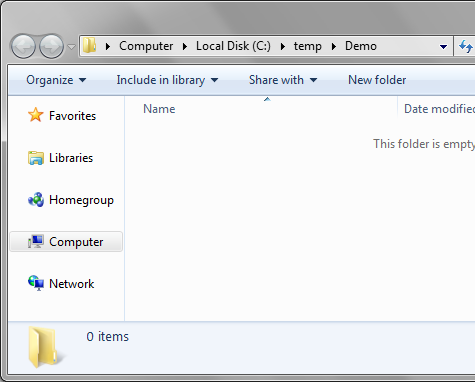
If you have Windows Explorer open and need a command prompt in that directory:

Go to the address bar, remove the directory name and enter "cmd"


Press enter, and voilĂ , your command prompt, initialised to the current directory.


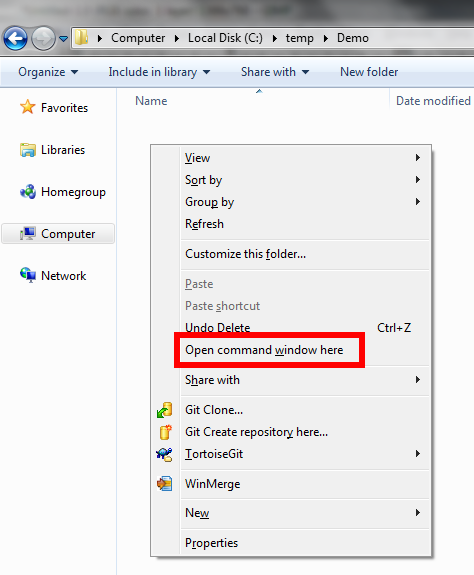
Shift-Right Click

Thanks to John (@imaji) for this tip.

If you hold Shift and right-click in Windows Explorer, you get an item added on the popup menu. The non-shift version looks like this:


But with shift held down, you get this:


Monday, 30 September 2013

What I Learnt About .Net Custom Formatters

I recently needed to format a DateTime object to a custom format, this post is a dump of what I learnt. It shows the steps necessary to implement a formatter that returns the name of the date's weekday. (This wasn't the custom format I needed to implement, it's just an example).

There are 2 components to formatting, a FormatProvider and a CustomFormatter - the FormatProvider's task is to serve up an instance of a CustomFormatter.

First, the FormatProvider:
    public class WeekdayFormatProvider : IFormatProvider
    {
        public object GetFormat(Type formatType)
        {
            throw new NotImplementedException();
        }
    }
Next, the CustomFormatter:
    public class WeekdayFormatter : ICustomFormatter
    {
        public string Format(string format, object arg, IFormatProvider formatProvider)
        {
            throw new NotImplementedException();
        }
    }
IFormatProvider.GetFormat() is called from within the string.Format method. The formatType argument is the type of CustomFormatter required; the convention is, if you can provide a formatter of that type, then return one, otherwise return null.
    public class WeekdayFormatProvider : IFormatProvider
    {
        public object GetFormat(Type formatType)
        {
            if (formatType == typeof(ICustomFormatter))
            {
                return new WeekdayFormatter();
            }
            return null;
        }
    }
The type of formatter required will change depending on the method used to invoke the FormatProvider. For example, the DateTime.ToString(IFormatProvider) method will request a formatter of type DateTimeFormatInfo. As this class is sealed, it's not possible to derive from it. So in order to use a custom formatter with a DateTime, you need to use a string.Format(IFormatProvider...) overload.

ICustomFormatter.Format() is also called from the string.Format method. It should return the formatted string for the required object (passed to the method via the arg parameter). For this example it just needs to calculate the day name and reverse it.
    public class WeekdayFormatter : ICustomFormatter
    {
        public string Format(string format, object arg, IFormatProvider formatProvider)
        {
            var dayName = ((DateTime)arg).DayOfWeek.ToString();
            return new string(dayName.Reverse().ToArray());
        }
    }
The format parameter is used to pass the formatString component of a format item.
So, for the usage
    string.Format(new WeekdayFormatProvider(), "{0:R}", DateTime.MinValue);
the arguments would be
    format : "R"
    arg : [DateTime.MinValue]
    formatProvider : WeekdayFormatProvider
The following shows how this format string could be used. The formatter is going to inspect the value passed; if it's "R" then reverse the weekday, otherwise return the weekday in the more usual format.
    public class WeekdayFormatter : ICustomFormatter
    {
        public string Format(string format, object arg, IFormatProvider formatProvider)
        {
            var dayName = ((DateTime)arg).DayOfWeek.ToString();
            if (format == "R")
            {
                return new string(dayName.Reverse().ToArray());
            }
            return dayName;
        }
    }
Another convention, in the Format() method, is to handle arguments that are not specifically of the type expected. The pattern is shown in this, the final version of the formatter:
    public class WeekdayFormatter : ICustomFormatter
    {
        public string Format(string format, object arg, IFormatProvider formatProvider)
        {
            try
            {
                var dayName = ((DateTime)arg).DayOfWeek.ToString();
                if (format == "R")
                {
                    return new string(dayName.Reverse().ToArray());
                }
                return dayName;
            }
            catch (InvalidCastException)
            {
                if (arg is IFormattable)
                {
                    return ((IFormattable)arg).ToString(format, CultureInfo.CurrentCulture);
                }
                else if (arg != null)
                {
                    return arg.ToString();
                }
                else
                {
                    return String.Empty;
                }
            }
        }
    }
Putting it all together, this usage:
        static void Main(string[] args)
        {
            var formatProvider = new WeekdayFormatProvider();
            
            var formattedMinDate = string.Format(formatProvider, "{0}", DateTime.MinValue);
            Console.WriteLine(formattedMinDate);
            
            var formattedMinDateReversed = string.Format(formatProvider, "{0:R}", DateTime.MinValue);
            Console.WriteLine(formattedMinDateReversed);

            var formattedInteger = string.Format(formatProvider, "{0:R} {1}", DateTime.MinValue, int.MaxValue);
            Console.WriteLine(formattedInteger);
            
            Console.ReadLine();
        }
gives this output:
Monday
yadnoM
yadnoM 2147483647
The final code used is available on GitHub at https://github.com/orangutanboy/CustomFormatter/

Saturday, 27 July 2013

Visual Studio's Make Object ID

Ever wished you could watch the value of an out-of-scope variable while debugging in Visual Studio? You can, if you use the Make Object ID option in the watch/local window. Here's an example, with a variable p that goes out of scope when control jumps to a new method, or back to the calling method:
class Person
{
    public Person(string name)
    {
        Name = name;
    }
    public string Name { get; set; }
}

public class Program
{
    public static void Main(string[] args)
    {
        DoIt();
    }

    private static void DoIt()
    {
        var p = new Person("Baldrick");
        DoIt2();
    }

    private static void DoIt2()
    {
        return;
    }
}
If you step through this code in Visual Studio and add a watch to variable p in method DoIt, the watch window will look like this:


When you step into method DoIt2, or out to Main, and refresh the watch on p, you get this message in the watch window:


If you want to be able to reliably watch the variable, the solution is to Make Object ID. Let's take the code back to DoIt and right-click on the watch on variable p:

Click on Make Object ID, and you'll see variable p is allocated object ID "1#"

If you add a watch to 1#, this allows you to view the value of p even when p goes out of scope:

The 1# reference can be used to update the value of the underlying variable p:

which will be reflected when (if) the object comes back into scope:


What about Garbage Collection?

The Object ID doesn't create a managed reference to the underlying object, which means that it will not interfere with its garbage collection: