Sunday, 13 October 2013

Refactoring legacy code to add tests

Imagine you have some legacy code in your product. Code that's been added to over the years by several different developers, none of who were certain they understood the code. There is no separation of concerns; the code has business logic and database access baked in. There's no useful documentation and the code comments are no more than sarcastic outbursts of cynicism.

A bug report has come in that suggests some of the SQL being executed from this method is invalid. So, what's the plan? Hack the SQL construction around until it feels like it does what you want, hoping you haven't broken anything else in the class? Or take a more structured approach?

To illustrate the problem, I have written some legacy-style code so I can show how to refactor it to make it testable. The techniques here are a pragmatic approach to getting legacy code under test, while making as few untested changes as necessary. Because as you will already know, a class is only able to be refactored when it's under test.

The code for the class is available on GitHub here, and looks like this
using System.Collections;

namespace CombinationOfConcerns
{
    public class Data
    {
        private readonly string _type;

        public Data(string type)
        {
            _type = type;
        }

        public ArrayList GetData(string code, string gdr, string filterType, bool getAge)
        {
            ArrayList results = null;

            var sql = "select id from people where type = " + _type + " and gender ='" + gdr + "'";
            string values = DatabaseWrapper.GetSingleResult(sql);
            for (int i = 0; i < values.Split(',').Length; i++)
            {
                switch (code)
                {
                    case "128855":
                        sql = "select name";
                        if (getAge)
                            sql += ",age";                    
                        sql += ",gender from people where type in(" + values + ")";
                        if (filterType == "45")
                        {
                            sql += " and gender='" + gdr + "'";
                        }
                        if (filterType == "87")
                        {
                            sql += " and shoesize = 43";
                        }
                        results = DatabaseWrapper.GetManyResults(sql);
                        break;
                    case "1493":
                        sql = "select dogs.name, dogbreeds.breed from";
                        sql += " dogs inner join dogbreeds on";
                        sql += " dogs.breed = breed.breed where dogs.ownerId in(" + values + ")";
                        if (filterType == "12")
                        {
                            sql += " and coat='curly'";
                        }
                        results = DatabaseWrapper.GetManyResults(sql);
                        break;
                    default:
                        sql = "select name, population from countries,people on where people.countryname = countries.name and people.id in(" + values + ")";
                        if (filterType == "f")
                        {
                            sql += " and countries.continent='South America'";
                        }
                        if (filterType == "642")
                        {
                            sql += " and countries.continent='Europe'";
                        }
                        results = DatabaseWrapper.GetManyResults(sql);
                        break;
                }
            }
            return results;
        }
    }
}

Run the code

Some great advice from Michael Feathers goes something like this: "if you need to see what some code does, run it." In practice, this means write a test that exercises the code, and see how far it gets without failing. If it doesn't fail, that route through the code has no dependencies and will be easier to write tests for. If it does fail, it will highlight dependencies that need to be abstracted.

To run some code, the first job is to find a suitable entry point to the method. If the method to test is public or internal, that's the entry point. If not, is the method called from a public or internal method? If not, the method should be made internal to allow it to be called directly.

The method on the Data class that needs testing is the public GetData method. Here's the first test:
        [TestFixture]
        public class GetData
        {
            [Test]
            public void WithEmptyArgs()
            {
                var target = new Data("");
                target.GetData("", "", "", false);
            }
        }
When this runs, the GetData method fails on a call to the DatabaseWrapper class, showing that there's a dependency on that class that needs to be faked for testing.
        public ArrayList GetData(string code, string gdr, string filterType, bool getAge)
        {
            ArrayList results = null;

            var sql = "select id from people where type = " + _type + " and gender ='" + gdr + "'";
            string values = DatabaseWrapper.GetSingleResult(sql);
            //Code fails in call to GetSingleResult

Deal with dependencies

If the DatabaseWrapper class was an instance, the best way to deal with it would be to extract its interface and use that interface through the code, allowing a stub to be used from a test. However, in this example DatabaseWrapper is a static class, so needs to be dealt with in a different way.

One way would be to add an instance wrapper class around the static class (DatabaseWrapperWrapper..?). This would call the static method from within that class's instance methods, and allow an interface to be used in the GetData method.

Another way is to add a protected virtual method in the Data class that wraps the static method; this allows the test code to use a subclass of the Data class, and override the virtual method. I'll demonstrate that. Here's the new virtual method and its usage in the GetData method:
        protected virtual string GetSingleResult(string sql)
        {
            return DatabaseWrapper.GetSingleResult(sql);
        }

        public ArrayList GetData(string code, string gdr, string filterType, bool getAge)
        {
            ArrayList results = null;

            var sql = "select id from people where type = " + _type + " and gender ='" + gdr + "'";

            //Now calls virtual method
            string values = GetSingleResult(sql);

and here's the usage in the test project. There's a new class, FakeData, that extends Data. This has an override of the virtual GetSingleResult method, returning an empty string for now. Note that the FakeData class is the new target for the test.
        [TestFixture]
        public class GetData
        {
            [Test]
            public void WithEmptyArgs()
            {
                var target = new FakeData("");
                target.GetData("", "", "", false);
            }

            private class FakeData : Data
            {
                public FakeData(string type)
                    : base(type)
                { }

                protected override string GetSingleResult(string sql)
                {
                    return "";
                }
            }
        }
The code under test now runs up to the call to DatabaseWrapper.GetManyResults, so the GetManyResults method needs a virtual wrapper the same as GetSingleResult did:
        protected virtual ArrayList GetManyResults(string sql)
        {
            return DatabaseWrapper.GetManyResults(sql);
        }
the calls to DatabaseWrapper.GetManyResults need to be changed to the local GetManyResults:
...
    default:
        sql = "select name, population from countries,people on where people.countryname = countries.name and people.id in(" + values + ")";
        if (filterType == "f")
        {
            sql += " and countries.continent='South America'";
        }
        if (filterType == "642")
        {
            sql += " and countries.continent='Europe'";
        }

        // Now calls the virtual method
        results = GetManyResults(sql);
        break;
...
and the FakeData class in the tests needs to override the method:
            private class FakeData : Data
            {
                public FakeData(string type)
                    : base(type)
                { }

                protected override string GetSingleResult(string sql)
                {
                    return "";
                }

                protected override ArrayList GetManyResults(string sql)
                {
                    return new ArrayList();
                }
            }
Now there's a test that mocks a call to the database, and runs through the method from start to finish. But because of the many responsibilities of the code, what needs to be asserted - the SQL that is being executed on the database - is not exposed outside the GetData method.

Sensing variables

In order to see the value of the SQL being executed, the test class will use a "sensing variable". This is a variable that stores a runtime value so that it is available for a test to perform an assertion on. In this example, the sensing variable will be on the FakeData class, and will store the value of the SQL string passed to the GetManyResults method.
        [TestFixture]
        public class GetData
        {
            [Test]
            public void WithEmptyArgs()
            {
                var target = new FakeData("");
                target.GetData("", "", "", false);
                // Use the sensing variable in the assertion
                Assert.That(target.ExecutedSql, Is.EqualTo(""));
            }

            private class FakeData : Data
            {
                // The sensing variable
                public string ExecutedSql { get; private set; }

                public FakeData(string type)
                    : base(type)
                { }

                protected override string GetSingleResult(string sql)
                {
                    return "";
                }

                protected override ArrayList GetManyResults(string sql)
                {
                    //Store the value in the sensing variable
                    ExecutedSql = sql;
                    return new ArrayList();
                }
            }
        }
A well-placed breakpoint allows the sensing variable's value to be harvested, and used as the expected result for that test.

            [Test]
            public void WithEmptyArgs()
            {
                var target = new FakeData("");
                target.GetData("", "", "", false);
                
                const string expected = "select name, population "
                    + "from countries,people on where people.countryname = "
                    + "countries.name and people.id in()";
                
                Assert.That(target.ExecutedSql, Is.EqualTo(expected));
            }
Which gives the first green test!

Although this single test is not particularly useful, the journey to get to it has shown some techniques that are available when tackling legacy code. In future posts I'll write more tests and get to a point where it's safe to refactor the code. The I'll refactor the hell out of it.

In Summary

  1. Run the code
    • Identify the start point
    • Make method visible (public/internal)
    • Write a test to exercise the code
  2. Deal with dependencies
    • Introduce interface for instance class
    • Wrap a static class in an instance class
    • Create virtual method to hide static method calls
  3. Sensing variables
    • Use to surface runtime values


If there are other techniques that you employ to refactor legacy code, I'd like to know what they are - they are all useful.

The before and after code used in this example is on GitHub at orangutanboy/LegacyCodeUnderTest

Wednesday, 2 October 2013

Open a command prompt in the current directory

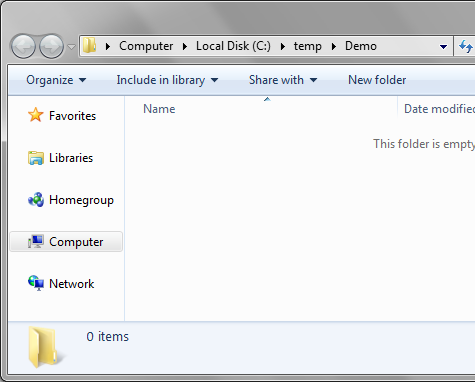
Type "cmd" in the address bar

This has been blogged elsewhere, but I was *so* amazed to see this that I needed to share it. All credit goes to Tom (@photomoose) for doing this while I was watching.


If you have Windows Explorer open and need a command prompt in that directory:

Go to the address bar, remove the directory name and enter "cmd"


Press enter, and voilĂ , your command prompt, initialised to the current directory.


Shift-Right Click

Thanks to John (@imaji) for this tip.

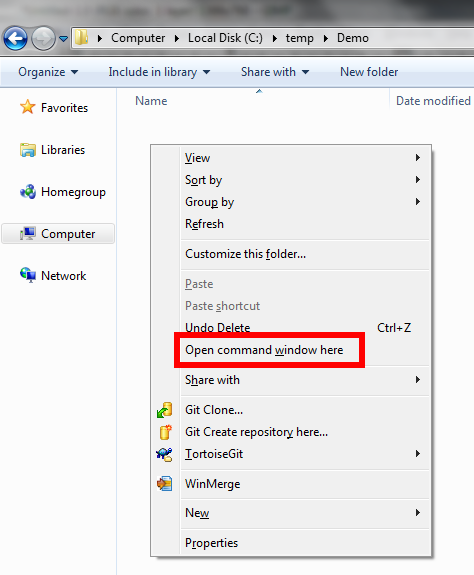
If you hold Shift and right-click in Windows Explorer, you get an item added on the popup menu. The non-shift version looks like this:


But with shift held down, you get this:


Monday, 30 September 2013

What I Learnt About .Net Custom Formatters

I recently needed to format a DateTime object to a custom format, this post is a dump of what I learnt. It shows the steps necessary to implement a formatter that returns the name of the date's weekday. (This wasn't the custom format I needed to implement, it's just an example).

There are 2 components to formatting, a FormatProvider and a CustomFormatter - the FormatProvider's task is to serve up an instance of a CustomFormatter.

First, the FormatProvider:
    public class WeekdayFormatProvider : IFormatProvider
    {
        public object GetFormat(Type formatType)
        {
            throw new NotImplementedException();
        }
    }
Next, the CustomFormatter:
    public class WeekdayFormatter : ICustomFormatter
    {
        public string Format(string format, object arg, IFormatProvider formatProvider)
        {
            throw new NotImplementedException();
        }
    }
IFormatProvider.GetFormat() is called from within the string.Format method. The formatType argument is the type of CustomFormatter required; the convention is, if you can provide a formatter of that type, then return one, otherwise return null.
    public class WeekdayFormatProvider : IFormatProvider
    {
        public object GetFormat(Type formatType)
        {
            if (formatType == typeof(ICustomFormatter))
            {
                return new WeekdayFormatter();
            }
            return null;
        }
    }
The type of formatter required will change depending on the method used to invoke the FormatProvider. For example, the DateTime.ToString(IFormatProvider) method will request a formatter of type DateTimeFormatInfo. As this class is sealed, it's not possible to derive from it. So in order to use a custom formatter with a DateTime, you need to use a string.Format(IFormatProvider...) overload.

ICustomFormatter.Format() is also called from the string.Format method. It should return the formatted string for the required object (passed to the method via the arg parameter). For this example it just needs to calculate the day name and reverse it.
    public class WeekdayFormatter : ICustomFormatter
    {
        public string Format(string format, object arg, IFormatProvider formatProvider)
        {
            var dayName = ((DateTime)arg).DayOfWeek.ToString();
            return new string(dayName.Reverse().ToArray());
        }
    }
The format parameter is used to pass the formatString component of a format item.
So, for the usage
    string.Format(new WeekdayFormatProvider(), "{0:R}", DateTime.MinValue);
the arguments would be
    format : "R"
    arg : [DateTime.MinValue]
    formatProvider : WeekdayFormatProvider
The following shows how this format string could be used. The formatter is going to inspect the value passed; if it's "R" then reverse the weekday, otherwise return the weekday in the more usual format.
    public class WeekdayFormatter : ICustomFormatter
    {
        public string Format(string format, object arg, IFormatProvider formatProvider)
        {
            var dayName = ((DateTime)arg).DayOfWeek.ToString();
            if (format == "R")
            {
                return new string(dayName.Reverse().ToArray());
            }
            return dayName;
        }
    }
Another convention, in the Format() method, is to handle arguments that are not specifically of the type expected. The pattern is shown in this, the final version of the formatter:
    public class WeekdayFormatter : ICustomFormatter
    {
        public string Format(string format, object arg, IFormatProvider formatProvider)
        {
            try
            {
                var dayName = ((DateTime)arg).DayOfWeek.ToString();
                if (format == "R")
                {
                    return new string(dayName.Reverse().ToArray());
                }
                return dayName;
            }
            catch (InvalidCastException)
            {
                if (arg is IFormattable)
                {
                    return ((IFormattable)arg).ToString(format, CultureInfo.CurrentCulture);
                }
                else if (arg != null)
                {
                    return arg.ToString();
                }
                else
                {
                    return String.Empty;
                }
            }
        }
    }
Putting it all together, this usage:
        static void Main(string[] args)
        {
            var formatProvider = new WeekdayFormatProvider();
            
            var formattedMinDate = string.Format(formatProvider, "{0}", DateTime.MinValue);
            Console.WriteLine(formattedMinDate);
            
            var formattedMinDateReversed = string.Format(formatProvider, "{0:R}", DateTime.MinValue);
            Console.WriteLine(formattedMinDateReversed);

            var formattedInteger = string.Format(formatProvider, "{0:R} {1}", DateTime.MinValue, int.MaxValue);
            Console.WriteLine(formattedInteger);
            
            Console.ReadLine();
        }
gives this output:
Monday
yadnoM
yadnoM 2147483647
The final code used is available on GitHub at https://github.com/orangutanboy/CustomFormatter/

Saturday, 27 July 2013

Visual Studio's Make Object ID

Ever wished you could watch the value of an out-of-scope variable while debugging in Visual Studio? You can, if you use the Make Object ID option in the watch/local window. Here's an example, with a variable p that goes out of scope when control jumps to a new method, or back to the calling method:
class Person
{
    public Person(string name)
    {
        Name = name;
    }
    public string Name { get; set; }
}

public class Program
{
    public static void Main(string[] args)
    {
        DoIt();
    }

    private static void DoIt()
    {
        var p = new Person("Baldrick");
        DoIt2();
    }

    private static void DoIt2()
    {
        return;
    }
}
If you step through this code in Visual Studio and add a watch to variable p in method DoIt, the watch window will look like this:


When you step into method DoIt2, or out to Main, and refresh the watch on p, you get this message in the watch window:


If you want to be able to reliably watch the variable, the solution is to Make Object ID. Let's take the code back to DoIt and right-click on the watch on variable p:

Click on Make Object ID, and you'll see variable p is allocated object ID "1#"

If you add a watch to 1#, this allows you to view the value of p even when p goes out of scope:

The 1# reference can be used to update the value of the underlying variable p:

which will be reflected when (if) the object comes back into scope:


What about Garbage Collection?

The Object ID doesn't create a managed reference to the underlying object, which means that it will not interfere with its garbage collection:


Sunday, 21 July 2013

How to post an HTTP form with .Net Micro Framework

This snippet of code shows how to use the .Net Micro Framework to create a representation of an HTTP form, and post it to a URL:
        public void PostNameValues(string value1, string value2)
        {
            // Create the form values
            var formValues = "name1=" + value1 + "&name2=" + value2;

            // Create POST content
            var content = Gadgeteer.Networking.POSTContent.CreateTextBasedContent(formValues);

            // Create the request
            var request = Gadgeteer.Networking.HttpHelper.CreateHttpPostRequest(
                @"http://www.mjonesweb.co.uk/api/values" // the URL to post to
                , content // the form values
                , "application/x-www-form-urlencoded" // the mime type for an HTTP form
            );

            // Post the form
            request.SendRequest();
        }

Sunday, 7 July 2013

Accessing the web with Gadgeteer ethernet module

I've discovered just how easy it is to use the Gadgeteer Ethernet J11D module from GHI Electronics to retrieve resources from the web. As ever, here's the project designer:

As for the code, it can be summed up in 3 steps:

  1. Get/supply an IP address
  2. Send a HTTP request to the URI
  3. Handle the HTTP response

using Gadgeteer.Networking;
using NetworkModule = Gadgeteer.Modules.Module.NetworkModule;
using Gadgeteer;

namespace Demo
{
    public partial class Program
    {
        void ProgramStarted()
        {
            //The other option is UseStaticIP
            ethernet.UseDHCP();

            //Set a handler for when the network is available
            ethernet.NetworkUp += ethernet_NetworkUp;
        }

        void ethernet_NetworkUp(NetworkModule sender, NetworkModule.NetworkState state)
        {
            //Set the URI for the resource
            var url = "http://i1072.photobucket.com/albums/w367/"
                + "M_J_O_N_E_S/MeGadgeteerSize_zps23202046.jpg?t=1373144748";

            //Create a web request
            var request = WebClient.GetFromWeb(url);

            //This is async, so set the 
            //handler for when the response received
            request.ResponseReceived += request_ResponseReceived;

            //Send the request
            request.SendRequest();
        }

        void request_ResponseReceived(HttpRequest sender, HttpResponse response)
        {
            if (response.StatusCode == "200")
            {
                //This only works if the bitmap is the 
                //same size as the screen it's flushing to
                response.Picture.MakeBitmap().Flush();
            }
            else
            {
                //Show a helpful error message
                lcd.SimpleGraphics.DisplayText("Request failed with status code " + response.StatusCode
                    , Resources.GetFont(Resources.FontResources.NinaB), Color.White, 0, 0);

                lcd.SimpleGraphics.DisplayText("Response text: " + response.Text
                       , Resources.GetFont(Resources.FontResources.NinaB), Color.White, 0, 50);

            }
        }
    }
}

Here's the result of the code:

And an example of when things don't go according to plan:

The web request can't only be used to download picture resources; if you request a run-of-the-mill HTML page, you are able to access the streamed response:


The code for this demo is available here on GitHub

Wednesday, 3 July 2013

What I learned about bluetooth with Gadgeteer

The Project

My recent Gadgeteer project was to investigate the Bluetooth module with a view to having a hassle-free way to communicate either between 2 Gadgeteer devices or between Gadgeteer and a Windows client.

I decided the best way to learn how the bluetooth module worked was by using Gadgeteer -> Windows, as it would make debugging easier. I came across the Bluetooth library from 32feet - this is a lovely layer of abstraction over the complexities of the bluetooth protocol, and ultimately gives you access to any serial data via a NetworkStream.

The goal of this experiment was to take a picture with the camera, convert it to a windows-compatible bitmap, and stream that over bluetooth to the client, which would create a bitmap from the bytes and display it on the screen. What could be easier?

This is the gadgeteer project:
The Windows client was not fancy; it consisted of a form with a picture box and progress bar.

What I Learnt

  • You should chunk your data. After some experimenting, I found the most reliable way to transfer a 320x240 pixel bitmap (totalling 230,454 bytes) was to split it into 93 chunks of 2,478 bytes each. I hadn't been able to transfer more than around 8k successfully, and my cut-off for reliably transferring data was around 3k.
  • Base64 encodings change between implementations. Don't assume that the .Net Framework will be able to unencode a Base64 string that was encoded on the .Net MicroFramework; I haven't got to the bottom of this one yet; there'll be another post when [if] I do. ** UPDATE ** I think this was how I was using the Base64 data when I received it, I was trying to extract chars rather than bytes.
  • Bluetooth isn't quick. Transferring a 230k bitmap takes around 90 seconds.
  • The Gadgeteer Bluetooth module needs time to warm up. Standard operating procedure for the bluetooth module is to create a timer that fires after 3 seconds of the modules initialising, so it can then enter pairing mode.

The Code

The code is available on Github. The Gadgeteer code is here and the windows client is here

The Result

Here's a picture showing the Gadgeteer LCD screen and the windows client side-by-side; you'll have to take my word for it that the image was bluetoothed...